
Knowledge We're going. Come say hi.

Implement at the speed of thought.

The CMA-grade agentic developer and implementation team for ServiceNow. Phyllis plans, develops, monitors, manages, and deploys on your instance — every change staged for your approval, nothing ships without you.

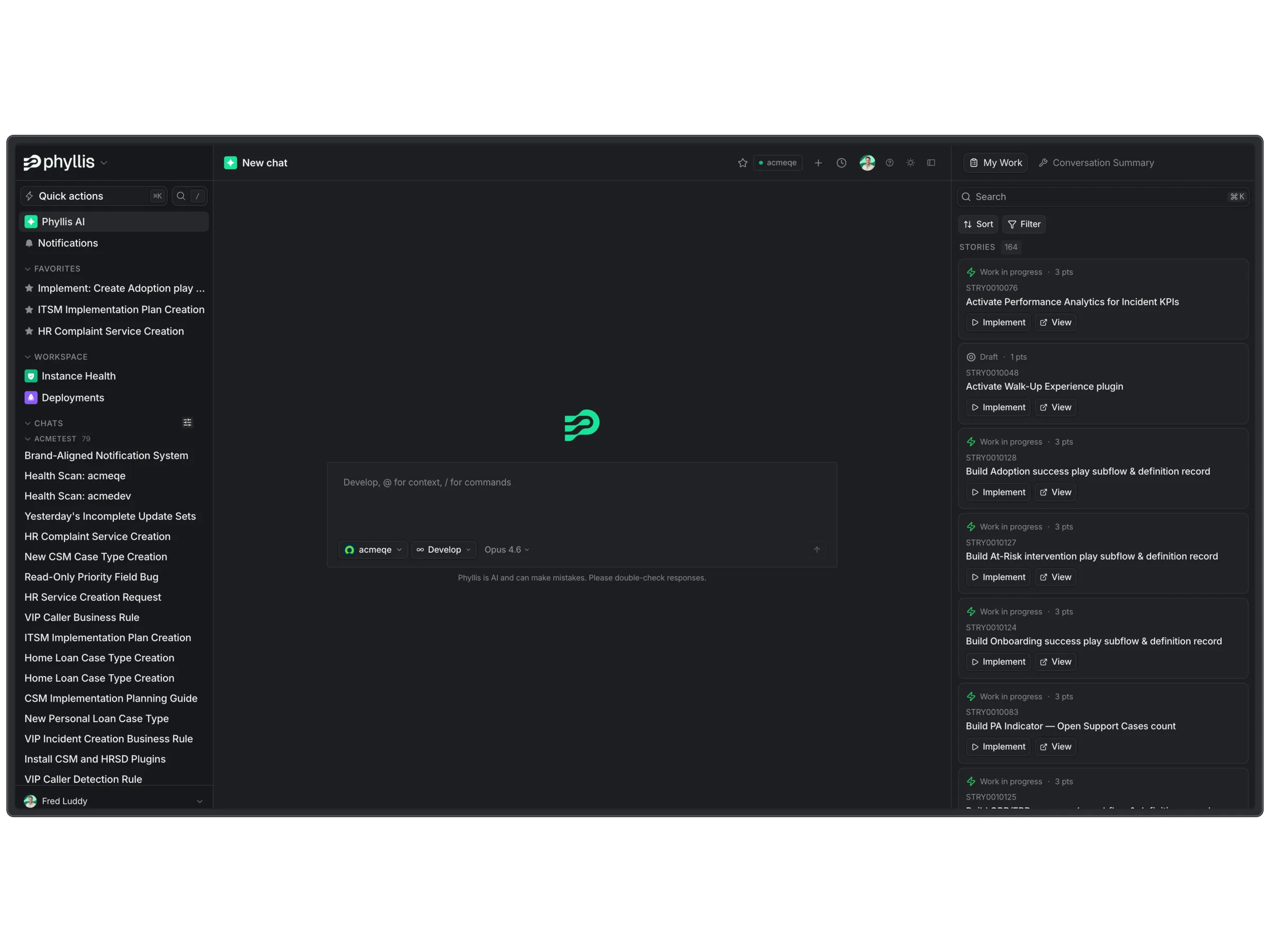
Phyllis AI workspace — chat, instance health, deployments, and stories panel

I described the change, Phyllis built it, and the update set was in UAT before my coffee went cold.

Senior ServiceNow Architect Enterprise healthcare customer

Scope

BAU backlog. End-to-end implementation. Same Phyllis.

Tackle the BAU backlog one story at a time, or stand up an end-to-end implementation across ITSM, HRSD, CSM, and TPSM. Same Phyllis, same approval gate, same audit trail — 500+ tools and 40+ specialised skills behind every change.

BAU FIG 02.A

BAU backlog

Burn through the backlog, one story at a time. Drop a Flow, Catalog Item, Record Producer, HR Service, or PA Indicator into chat — Phyllis plans, builds, scans, and stages an update set for your approval. Minutes, not days.

Drag the top card into the chat
  • Flow

    Vendor onboarding

    Single update set · 5–8 min build

  • Catalog item

    Laptop replacement

    Cat · 4 fields · approval rule

  • Record producer

    Contractor portal

    Producer · creates HR case

  • HR service

    Parental leave request

    HR service · routed to HR ops

  • PA indicator

    Change success rate

    Indicator · 90-day rolling

Develop, @ for context, / for commands
acmetest Develop claude-opus-4-7

Implementation FIG 02.B

E2E implementation

Plan and develop end-to-end across ITSM, HRSD, CSM, and TPSM. Specialised agents per product, every gate under your sign-off — the whole program lands on your instance with the audit trail attached.

In flight 3 programs · 102 stories
  • ITSM IMP-0042 · 47 stories
    Build
  • HRSD IMP-0048 · 31 stories
    Gate
  • CSM IMP-0051 · 24 stories
    Plan

Next gate · ITSM Build → CAB · 29 Apr

One system for the whole lifecycle — plan, build, monitor, manage, and deploy, grounded in your instance.

Plan

Plan

Describe the outcome in your own words. Phyllis returns a sequenced plan — stories written, acceptance criteria defined, dependencies mapped — ready to execute.

See how Phyllis plans.
Docs
MyNow
Learning
Web
ITSM Plan Ready

28 Stories

HRSD Plan Ready

19 Stories

CSM Plan Ready

22 Stories

Develop

Develop

AI Agents, Flows, Catalog Items, ACLs, business rules, and so much more — all captured in the right update sets, in the right scope, with a CMA-grade design doc and ATF pass attached. Nothing promotes until you say so.

See how Phyllis develops.
Prompt
Ask Phyllis
Natural language

“Add a P1 escalation rule on incident close”

Reasoning
Reason across instance
AI

Check scope, ACLs, dependencies, ATF coverage

High confidence Needs review
Create update set
Auto

Business rule + ATF · scope: x_pyl

Route to reviewer
Hold

Assign service owner to approve

Monitor

Monitor

83 scan definitions ship out of the box — across upgradeability, performance, security, user experience, and maintainability — to keep your instance healthy and aligned to best practice. Phyllis also monitors every build: after every dev task, Phyllis runs a scan. The difference is Phyllis can self-heal. Run scans ad hoc against an update set or the full instance.

See how Phyllis monitors.
ServiceNow Instance Scan
Hardcoded sys_ids AI
Found in 4 business rules and 2 script includes.
Update set · created
Deprecated API AI
getXMLAnswer() flagged in 3 client scripts — replace with getXMLWait.
Update set · created
Orphaned ACL AI
u_contract.manager points to a renamed field.
Update set · created

Manage

Manage

Live access to the full ServiceNow docs and release notes, with upgrade prep prepared ahead of the window — deprecated APIs flagged, scoped apps to test surfaced, custom code to refactor mapped against your instance.

See how Phyllis manages.
Policy.v14 Owner · CAB
Approvals required
  • Platform Lead
  • Security
  • Change Manager
ServiceNow ITSM · Implementation G…
docs.servicenow.com
Flow Designer · Scoping subflows
docs.servicenow.com
KB0912344 · Approval plugin migra…
now-support.servicenow.com
Xanadu Patch 4 · Known issues
servicenow.com/release-notes
CSA Study Guide · GlideRecord
nowlearning.servicenow.com

Deploy

Deploy

A drag-and-drop deployment canvas with multiplayer — see who's pushing what, across every instance, live. Phyllis resolves conflicts. No more XML exports, no more clobbered update sets.

See how Phyllis deploys.
How it works

Connected in ninety seconds. Shipping in the next ten.

FIG 0.1

Connect your instance in ninety seconds via OAuth 2.0.

Per-user OAuth with least-privilege scopes. Your ACLs are fully honoured — Phyllis only sees and configures what the connected user can. No agents, no mid-prod surprises.

FIG 0.2

Say the idea out loud. Phyllis builds it.

"Stand up an AI Agent for L1 Support." "Implement change management with CAB approvals." No tickets. No briefs. No eight-week discovery. Just describe it.

FIG 0.3

Every change is shown to you before it runs.

Plain-English summary of exactly what will land. Approve, edit, or reject in one click — nothing touches your instance without your sign-off.

FIG 0.4
Deployed successfully:
1 record — 1 created
CREATED
VIP Caller - Set Priority and Work Notes
Business Rule · 5728592e

Approved changes land in a clean update set, audit trail attached.

Instance Scan and ATF run on every change before it promotes — so speed never costs you a rollback.

Frequently asked

What people ask before they connect.

Security & data
  • Yes — and it's the default, not a toggle. Phyllis has enterprise agreements with every model provider we route to: no data is retained, and nothing is ever used to train a large language model. ZDR is on for every tenant, out of the box.

  • Only scan findings. When you run Instance Scan directly from Phyllis, findings are stored in Phyllis so we can reason over them and remediate on approval. No CMDB data, no case content, no user PII. Nothing sent to the underlying models is retained, per the ZDR guarantee above. If you'd rather keep findings out of Phyllis entirely, run scans natively in ServiceNow instead — Phyllis will still offer remediations by referencing the findings.

  • Every user connects to their instance via OAuth, and all existing roles and ACLs are honoured. If they can't do it in the ServiceNow UI, they can't do it through Phyllis. Every action is attributed back to that user, so audit logs stay legible and least-privilege is enforced by the instance itself — not by a policy memo.

  • Phyllis only ever looks at what's necessary for the ask on hand — nothing more. No blanket access to things like HR case records, no pulling data it doesn't need to answer the question. And as covered above, every connection is OAuth-scoped to the user, so what they can't see in ServiceNow, Phyllis can't either.

Environments
  • The more customised, the better. Phyllis reads your actual business rules, ACLs, client scripts, Flow Designer flows, and ATF suites, then reasons about change against what's there — not against a textbook OOTB reference. The more customised the instance, the more value Phyllis adds relative to a generalist developer.

  • Yes. A workspace can connect any number of instances — dev, test, prod, per-region tenants, customer-specific clones. Phyllis keeps context separated per instance, and the deployment canvas shows recent activity across connected instances so the team has a shared view of what's been pushed.

  • Both. Phyllis is scope-aware: it understands scope boundaries, cross-scope references, restricted caller access, and which records should land in which scoped application. Changes are captured in the correct update set with the correct scope selected — never orphaned in Default or Global by accident.

  • Yes. Phyllis knows which scope every record lives in, so one conversation can move across as many scopes as the work requires. If a fix needs changes in scope A and a new record in scope B, Phyllis creates the update set in A, configures, switches scope, configures again, and keeps every change where it belongs. You always know which scope a given change will land in.

How Phyllis works
  • Phyllis was trained by CMAs and CTAs — with 40+ domain skills and 500+ tools on top, grounded in CMA-grade best practice. End-to-end, that covers discovery (reading your live instance), planning (scoped stories, sized, with acceptance criteria), building (AI Agents, Flows, Catalog Items, Business Rules, ACLs, Flow Designer flows, ATFs, Virtual Agent, Performance Analytics), monitoring (drift, broken references, failing ATFs), documentation (CMA-grade design docs), and deployment (update set staging, canvas, preview-problem resolution).

  • Multi-round by design. Phyllis builds up understanding across turns — you can refine a plan over five conversations, come back a week later, and context resumes. Every plan, build, and design doc is versioned, so you can fork, compare, or roll back any decision the conversation produced.

  • No. Everything Phyllis produces — update sets, ATF results, Instance Scan findings, design documents — stages for your review. Nothing commits to any instance without your approval. Problems are one click to re-prompt with full context preserved.

  • Four minutes. Register the OAuth app, connect your instance, and you're in. No training data uploads, no fine-tuning, no setup checklist — Phyllis is ready for real work the moment you're connected.

Platform coverage
  • We don't pretend Phyllis can do everything. Today Phyllis has full domain-skill coverage for end-to-end implementations of Core Platform, Now Assist, ITSM, CSM, HRSD, and TPSM — with 40+ domain skills and 500+ tools spanning the rest of the platform. If there's no domain skill for what you're asking, Phyllis won't pretend, won't make it up, and won't bullshit you — Phyllis will say so, and tell you what's possible instead.

  • Phyllis indexes the ServiceNow Store and the plugin catalogue. Describe what you need in your own words — Phyllis matches candidates against your instance (version, dependencies, scope compatibility) and stages the install for your approval. No more guessing at exact plugin names.

  • ServiceNow's Certified Master Architect is the top architecture certification on the platform. Every plan, build, and design document Phyllis produces is held to the review standard a CMA would apply — executive summary, discovery findings, impact analysis, dependency mapping, cited sources, and a defensible recommendation the reviewer can sign.

Implement now.