
Employee XP
Onboarding that greets each new hire by name — and walks them through day one.
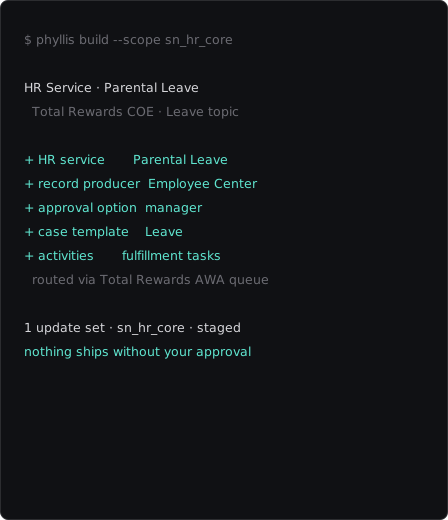
Phyllis builds and extends your entire employee-journey operation — any lifecycle event, guided plan or personalized landing — grounded in your live instance and staged for your approval.


Scan journey setup
Show me how onboarding runs today — the journey types, plans and where new hires land.
 Sonnet 5 Low
 Onboarding journey
Build a guided onboarding journey with Pre-boarding, Day 1, Week 1 and Month 1 stages.
Sonnet 5 Low Stage activities
Add the activities each new hire, their manager and their mentor complete in week one.
Sonnet 5 Low Lifecycle event
Wire the onboarding journey to launch automatically when a new hire is created.
Sonnet 5 Low Manager & mentor tasks
Give managers their own reminders and mentors their own checklist, separate from the new hire's view.
Sonnet 5 Low Role-specific plans
Layer a sales-hire plan on top of the base onboarding plan without duplicating it.
Sonnet 5 Low Recommended learning
Attach recommended courses to the onboarding journey so new hires see them on day one.
Sonnet 5 Low Quick links
Surface benefits, payroll and IT setup as quick links on the new-hire journey.
Sonnet 5 Low Audience targeting
Show the relocation stage only for hires moving to a new city.
Sonnet 5 Low Offboarding plan
Create an offboarding plan that walks a leaver and their manager through the final two weeks.
Sonnet 5 Low Branded landing
Rebrand our Employee Center AI landing to our colours and logo.
Sonnet 5 Low Landing search
Point the employee landing search at knowledge and the service catalog so new hires find answers fast.
Sonnet 5 Low Scan journey setup
Show me how onboarding runs today — the journey types, plans and where new hires land.
Sonnet 5 Low Onboarding journey
Build a guided onboarding journey with Pre-boarding, Day 1, Week 1 and Month 1 stages.
Sonnet 5 Low Stage activities
Add the activities each new hire, their manager and their mentor complete in week one.
Sonnet 5 Low Lifecycle event
Wire the onboarding journey to launch automatically when a new hire is created.
Sonnet 5 Low Manager & mentor tasks
Give managers their own reminders and mentors their own checklist, separate from the new hire's view.
Sonnet 5 Low Role-specific plans
Layer a sales-hire plan on top of the base onboarding plan without duplicating it.
Sonnet 5 Low Recommended learning
Attach recommended courses to the onboarding journey so new hires see them on day one.
Sonnet 5 Low Quick links
Surface benefits, payroll and IT setup as quick links on the new-hire journey.
Sonnet 5 Low Audience targeting
Show the relocation stage only for hires moving to a new city.
Sonnet 5 Low Offboarding plan
Create an offboarding plan that walks a leaver and their manager through the final two weeks.
Sonnet 5 Low Branded landing
Rebrand our Employee Center AI landing to our colours and logo.
Sonnet 5 Low Landing search
Point the employee landing search at knowledge and the service catalog so new hires find answers fast.
Sonnet 5 Low